Linear Link 2D
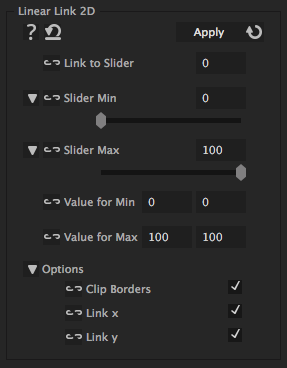
This iExpression links a 2D property to a slider (or some other 1D property - like audio keyframes). You specify which value the 2D property should have when the slider has its minimum value and which value it should have when the slider has its maximum value. For all other slider values the iExpression chooses automatically an appropriate value (using linear interpolation).
Link to Slider
Don't put a number here. Use the link button to link this to a slider control, an audio amplitude or some other 1D property.
Slider Min
the smallest value of the slider control (or of the audio level or whatever other property you link to)
Slider Max
the largest value of the slider control (or of the audio level or whatever other property you link to)
Value for Min
the value that the property should have when the linked slider has its minimal value
Value for Max
the value that the property should have when the linked slider has its maximal value
Options
Clip Borders
If this is enabled, the property will never have values smaller than 'Value for Min' or larger than 'Value for Max', even if the slider that the property is linked to has values smaller than 'Slider Min' or larger than 'Slider Max'.
Link x
Without this option the X value is not linked but taken from the keyframes instead
Link y
Without this option the Y value is not linked but taken from the keyframes instead
Download at aescripts.com
Tips
Animating to Music - Part 1
tip

This tutorial for sternfx.com uses different audio and linking iExpressions to animate things automatically according to music.
Create Your Own Little Fuzzy Friends from Aetuts+
tip

In this tutorial the Linear Link 2D iExpression is used to squash a cute fuzzy creature when it bounces at the ground. This iExpression is used around 15:03, the entire iExpressions-based creature rigging starts around 11:30.