Pendulum
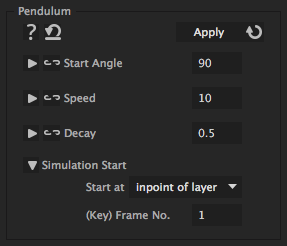
With this iExpression you can rotate a layer such that it oscilates like a pendulum. The point around which the pendulum rotates is the anchor point of the layer. On 2D layers the iExpression can be applied to the rotation, on 3D layers it can be applied to the x rotation, y rotation or z rotation.
Start Angle
determines, in which angle (in degrees) the pendulum starts.
Speed
is the speed with which the pendulum starts oscillating.
Decay
determines how fast the movement decays.
Simulation Start
Start at
controls at which point in time the simulation starte (at the inpoint of the layer, an a manually chosen keyframe or at a manually chosen frame)
(Key) Frame No.
is the frame or the keyframe (depending on the choice of "Start at" option) at which the pendulum simulation starts. When "Start at" has the value 'inpoint of layer' this option is ignored.
Download at aescripts.com