Look At Point 2D
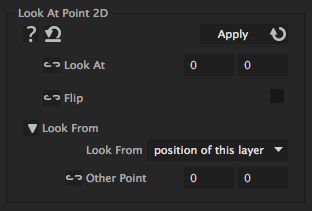
This iExpression is applied to the rotation of a 2D layer. It rotates the layer such that it always "looks" towards the given point. The rotation can still be adjusted using keyframes as usual.
Look At
is the point at which the layer should "look".
Flip
flips the rotation such that the layer does not look at the point but looks away from it (i.e. turns its back on it).
Look From
Look From
if you choose 'other point' here, the layer looks not from its own position but as if it was located at some other position. If you want, for example, that the layers looks in exactly the same direction as another layer which uses this iExpression, then you can simply link this other layer's position to 'other point'.
Other Point
is the point at which the layer should "look" when the option 'other point' has been choosen for 'Look From'.
Download at aescripts.com