Counter Numbers
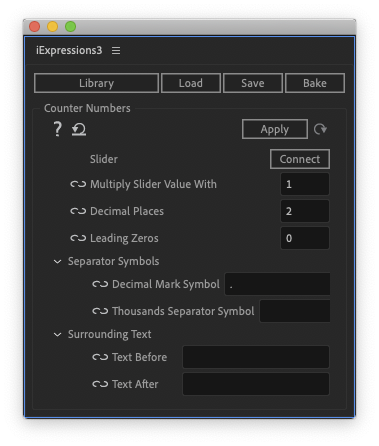
This iExpression creates a text that can be used as a counter to create, for example, a countdown. The iExpression has some similarities with the effect Numbers, but offers several advantages: 1) numbers larger than 30 000 can be created 2) the decimal marker symbol can be configured freely 3) an optional thousands separator symbol can group the number into blocks of three digits 4) you can add text before and after the actual number 5) it works directly with the source text property to text layers instead of an effect on a solid layer.

Slider
link this to a slider control which you can keyframe to control the number shown by the counter
Multiply Counter Value With
normally 1. If you enter, for example, 1000 the number shown by the counter is 1000 times as large as the value of your linked slider. This is useful if you need to create numbers that are larger than the value range of slider controls.
Decimal Places
how many fractional digits of the number are shown
Leading Zeros
for 5, for example, the number is extended with zeros until it contains 5 number of places before the decimal separator, i.e. 312 would become 00312
Separator Symbols
Decimal Mark Symbol
symbol used to separate the whole part from the fractional part of a number (usually . or ,)
Thousands Separator Symbol
For ease of reading, numbers with many digits may be divided into groups of three digits using a delimiter. Enter here the delimiter symbol (e.g. a space, a point or nothing at all)
Surrounding Text
Text Before
an optional text that is inserted before the counter itself
Text After
an optional text that is inserted after the counter itself
Download at aescripts.com